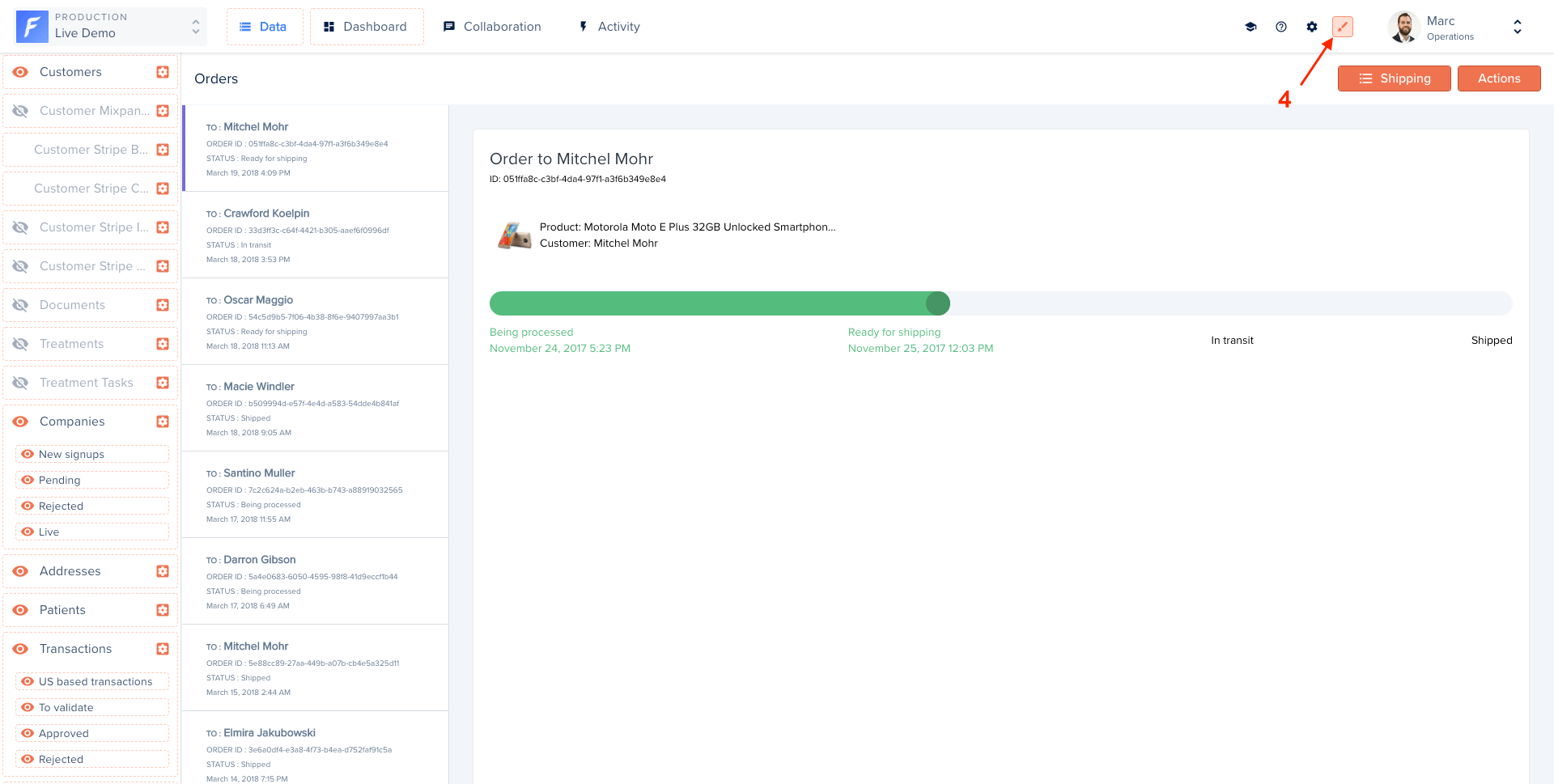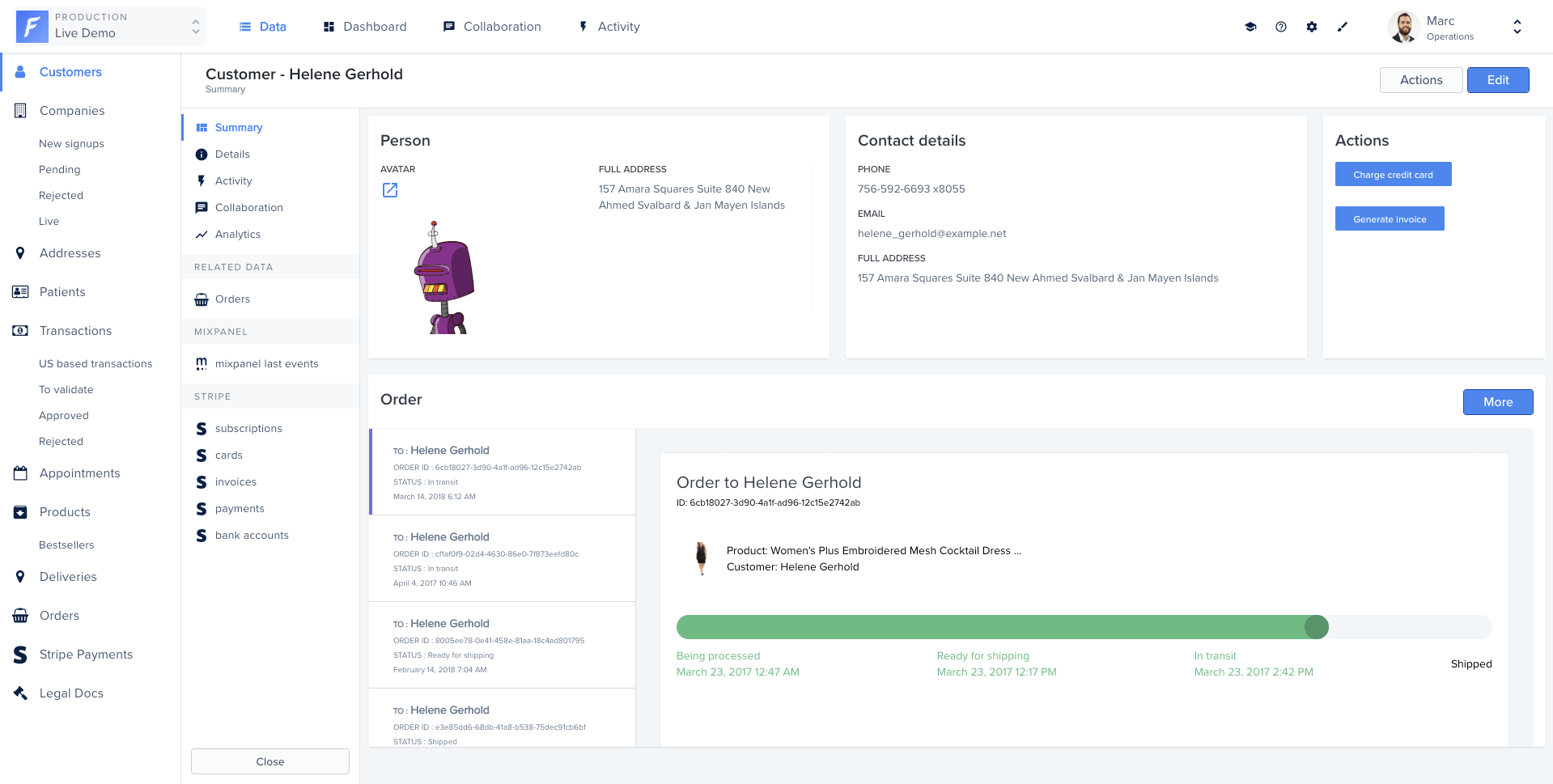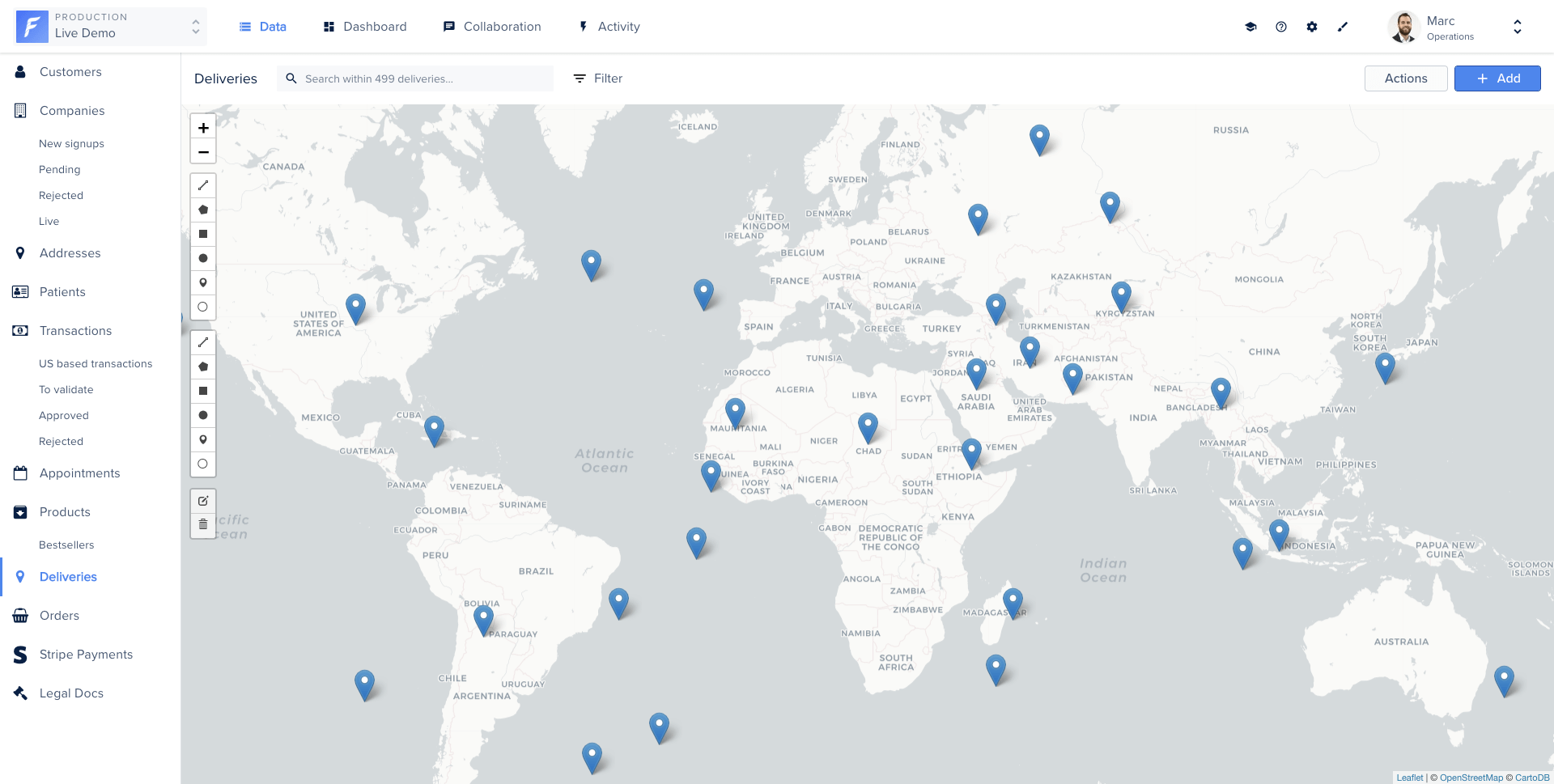
Smart Views let you replace the default table view with any UI you can code. Display orders on a map, events in a calendar, pictures in a gallery, all powered by your real data and integrated with Forest actions.
What is a smart view?
A Smart View is a Glimmer Component composed of three files: a JavaScript component, an HTML/Handlebars template, and a CSS stylesheet. Forest hosts and runs this code directly in your back-office.
You don’t need to know Ember.js to write a Smart View. The examples below cover all the patterns you’ll need. For advanced use, refer to the Glimmer Component and Handlebars Template documentation.
Your code must be compatible with Ember 4.12.
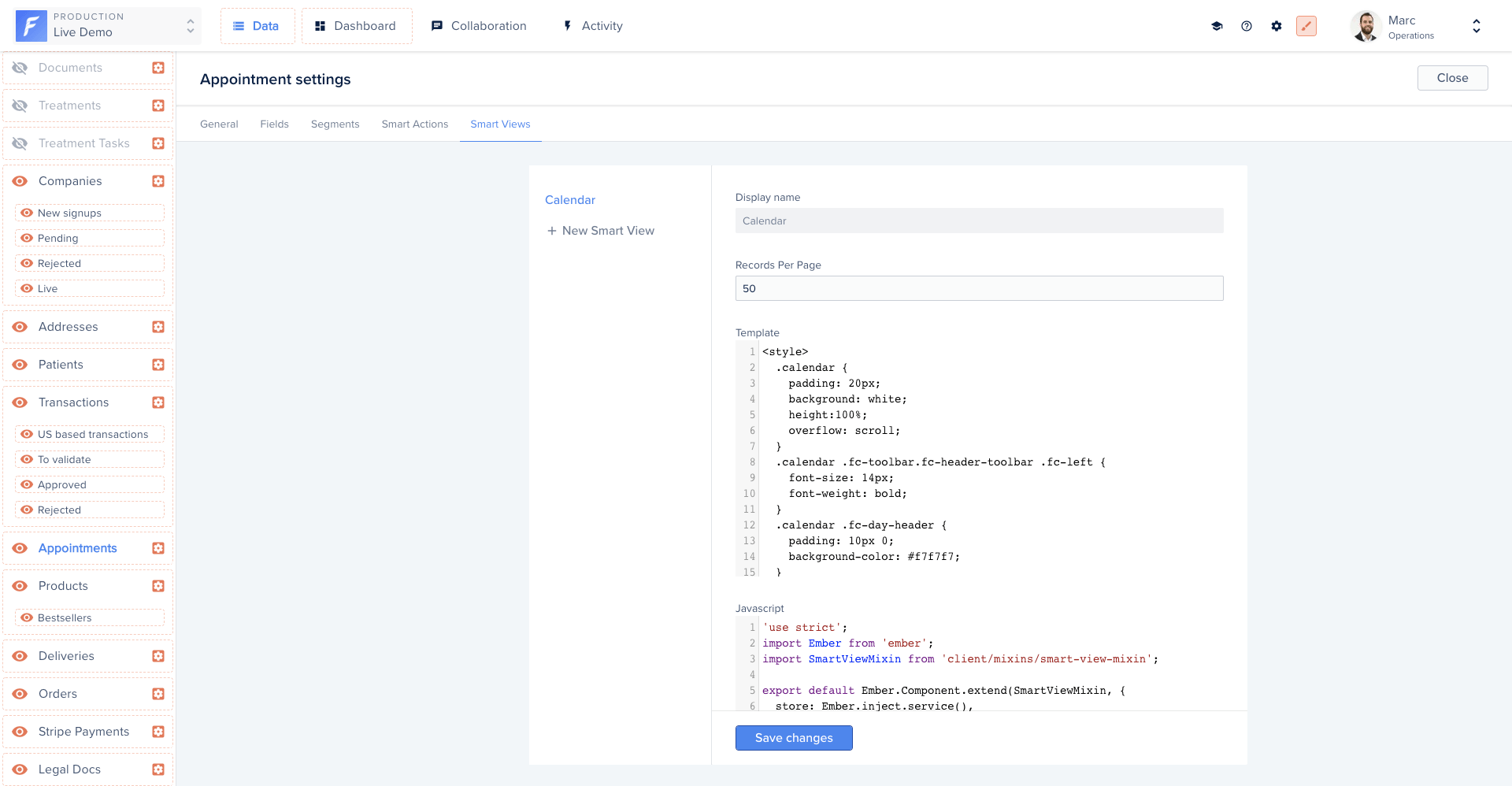
Creating a smart view
Forest provides an online editor to write your Smart View code. Access it from the collection’s Settings, then the Smart Views tab.
Available properties
Forest automatically injects the following properties into your Smart View:
| Property | Type | Description |
|---|
collection | Model | The current collection |
currentPage | Number | The current page |
isLoading | Boolean | Indicates if the UI is currently loading records |
numberOfPages | Number | The total number of available pages |
records | Array | Your data entries |
searchValue | String | The current search value |
Available actions
Forest also injects the following actions:
| Action | Description |
|---|
deleteRecords(records) | Delete one or multiple records |
triggerSmartAction(collection, actionName, record) | Trigger an action defined on the specified collection on a record |
Working with records
Iterating over records
Access all records from the @records property and iterate in your template:
{{#each @records as |record|}}
{{/each}}
Accessing field values
Access field values using the forest- prefix before the field name:
{{#each @records as |record|}}
<p>Status: {{record.forest-shipping_status}}</p>
{{/each}}
Accessing belongsTo relationships
Accessing a belongsTo relationship works the same as a field. Forest automatically fetches the related data via API when needed:
{{#each @records as |record|}}
<h2>
Order to
{{record.forest-customer.forest-firstname}}
{{record.forest-customer.forest-lastname}}
</h2>
{{/each}}
Accessing hasMany relationships
Same behavior applies for hasMany relationships:
{{#each @records as |record|}}
{{#each record.forest-comments as |comment|}}
<p>{{comment.forest-text}}</p>
{{/each}}
{{/each}}
Refreshing records
Call @fetchRecords to reload the current page of records:
<button {{on 'click' @fetchRecords}}>
Refresh
</button>
Fetching records with custom filters
Use the store service to query any collection with custom filters. In the example below, a calendar view fetches appointments within a date range:
import Component from '@glimmer/component';
import { inject as service } from '@ember/service';
import { tracked } from '@glimmer/tracking';
export default class extends Component {
@service store;
@tracked appointments;
async fetchData(startDate, endDate) {
const params = {
filters: JSON.stringify({
aggregator: 'And',
conditions: [
{ field: 'start_date', operator: 'GreaterThan', value: startDate },
{ field: 'start_date', operator: 'LessThan', value: endDate },
],
}),
timezone: 'America/Los_Angeles',
'page[number]': 1,
'page[size]': 50,
};
this.appointments = await this.store.query('forest_appointment', params);
}
}
{{#each this.appointments as |appointment|}}
<p>{{appointment.id}}</p>
<p>{{appointment.forest-name}}</p>
{{/each}}
Query parameters
| Parameter | Type | Description |
|---|
filters | Object | A stringified JSON object. A single filter uses { field, operator, value }. An aggregation uses { aggregator: "and"/"or", conditions: [...] }. Operators: less_than, greater_than, equal, after, before, contains, starts_with, ends_with, not_contains, present, not_equal, blank |
timezone | String | Timezone string, e.g. America/Los_Angeles |
page[number] | Number | Page number to fetch |
page[size] | Number | Number of records per page |
Deleting records
The deleteRecords action deletes one or multiple records. A confirmation dialog is shown automatically.
{{#each @records as |record|}}
<Button::BetaButton
@type='danger'
@text='Delete record'
@action={{fn this.deleteRecords record}}
@async={{false}}
/>
{{/each}}
import Component from '@glimmer/component';
import { action } from '@ember/object';
import { deleteRecords } from 'client/utils/smart-view-utils';
export default class extends Component {
@action
deleteRecords(...args) {
return deleteRecords(this, ...args);
}
}
Triggering actions
Action triggering inside the Smart View editor may not work correctly, as not all context is available. Test action execution from the Smart View applied to the collection view.
Use triggerSmartAction to invoke an action directly from your Smart View.
<Button::BetaButton
@type='primary'
@text='Reschedule appointment'
@action={{fn this.triggerSmartAction @collection 'Reschedule' record}}
/>
import Component from '@glimmer/component';
import { action } from '@ember/object';
import { triggerSmartAction, deleteRecords } from 'client/utils/smart-view-utils';
export default class extends Component {
@action
triggerSmartAction(...args) {
return triggerSmartAction(this, ...args);
}
@action
deleteRecords(...args) {
return deleteRecords(this, ...args);
}
}
The triggerSmartAction function signature:
function triggerSmartAction(
context,
collection,
actionName,
records,
callback = () => {},
values = null,
)
| Argument | Description |
|---|
context | Reference to the component, use this |
collection | The collection where the action is defined |
actionName | The action name |
records | An array of records or a single record |
callback | Function executed after the action completes, receives the action result as its only parameter |
values | Object containing values to pre-fill the action form fields |
To pass values programmatically and skip the action form:
<Button::BetaButton
@type='primary'
@text='Reschedule appointment'
@action={{fn this.rescheduleToNewTime record}}
/>
import Component from '@glimmer/component';
import { action } from '@ember/object';
import { triggerSmartAction, deleteRecords } from 'client/utils/smart-view-utils';
import { tracked } from '@glimmer/tracking';
export default class extends Component {
@tracked newTime = '11:00';
@action
triggerSmartAction(actionName, records, values) {
return triggerSmartAction(
this,
this.args.collection,
actionName,
records,
() => {},
values,
);
}
@action
rescheduleToNewTime(record) {
this.triggerSmartAction('Reschedule', record, { newTime: this.newTime });
}
@action
deleteRecords(...args) {
return deleteRecords(this, ...args);
}
}
Applying a smart view
To activate a Smart View on a collection:
- Enable the Layout Editor mode (top navigation bar)
- Click the view type button (table icon)
- Drag and drop your Smart View to the first position in the dropdown
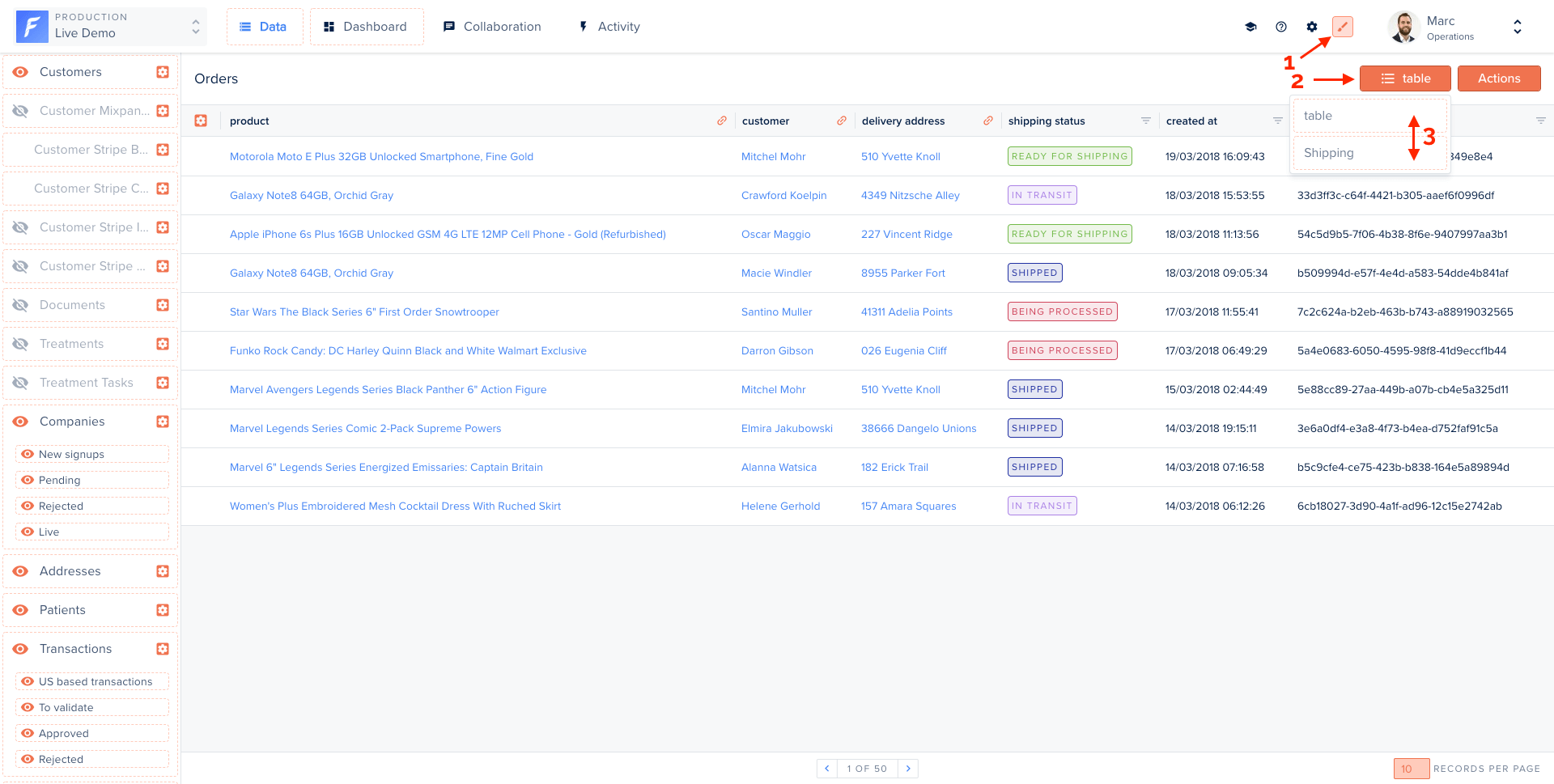
The view refreshes automatically. Disable Layout Editor mode when done.
Once a Smart View is applied to a collection, it also appears in related data panels and summary views. It is not currently possible to set different views for the table, summary, and related data contexts independently.
Examples
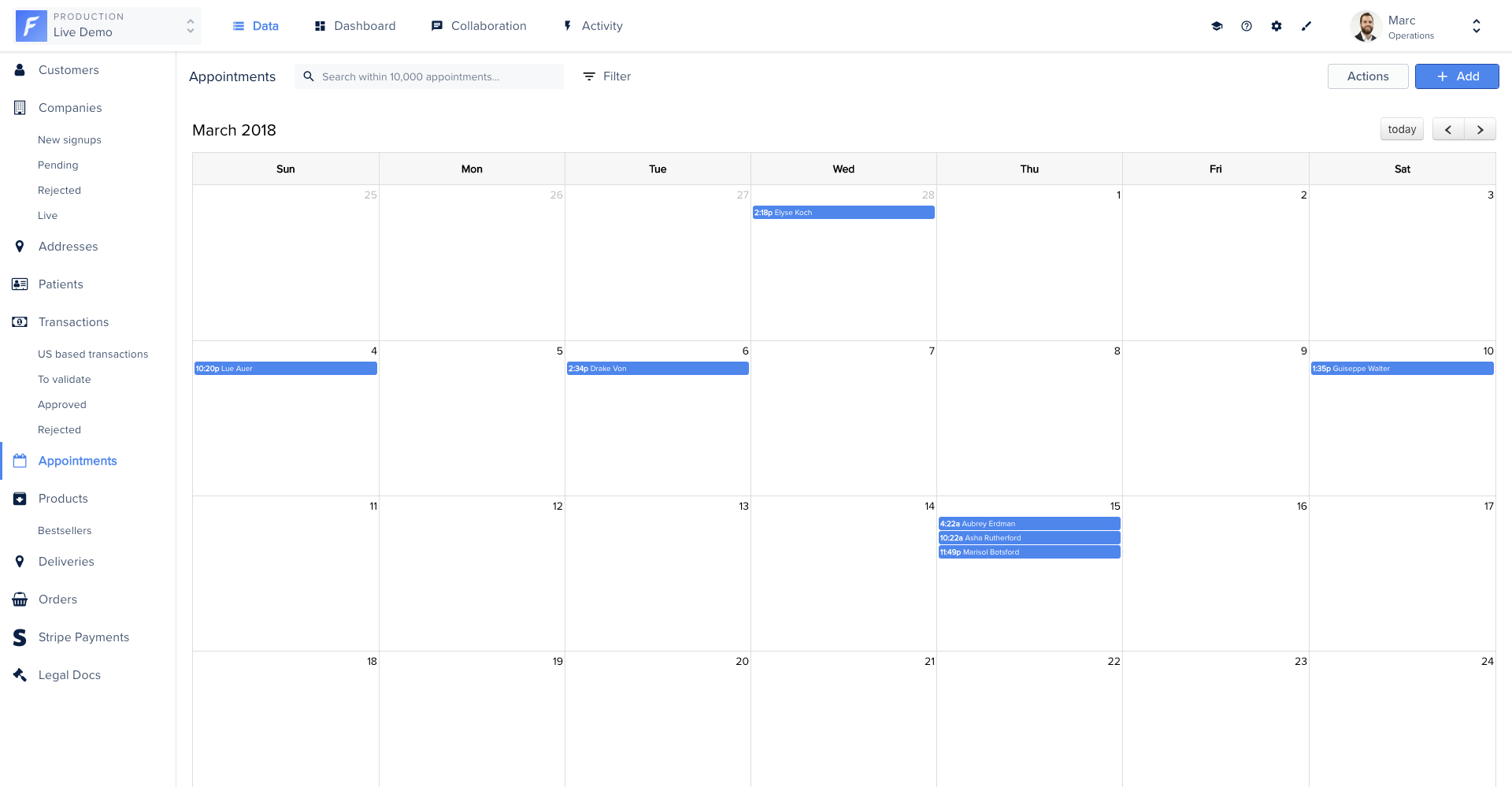
Calendar view
Displays collection records on a calendar using FullCalendar. The component loads the library from CDN and uses date-range conditions to fetch relevant records.
import Component from '@glimmer/component';
import { inject as service } from '@ember/service';
import { action } from '@ember/object';
import { tracked } from '@glimmer/tracking';
import { guidFor } from '@ember/object/internals';
import {
triggerSmartAction,
deleteRecords,
loadExternalStyle,
loadExternalJavascript,
} from 'client/utils/smart-view-utils';
export default class extends Component {
@service() router;
@service() store;
@tracked conditionAfter = null;
@tracked conditionBefore = null;
@tracked loaded = false;
constructor(...args) {
super(...args);
this.loadPlugin();
}
get calendarId() {
return `${guidFor(this)}-calendar`;
}
async loadPlugin() {
loadExternalStyle(
'https://cdn.jsdelivr.net/npm/fullcalendar@6.1.8/index.global.min.css',
);
await loadExternalJavascript(
'https://cdn.jsdelivr.net/npm/fullcalendar@6.1.8/index.global.min.js',
);
this.loaded = true;
this.onInsert();
}
@action
onInsert() {
if (!this.loaded || !document.getElementById(this.calendarId)) return;
this.calendar = new FullCalendar.Calendar(
document.getElementById(this.calendarId),
{
allDaySlot: false,
minTime: '00:00:00',
initialDate: new Date(2018, 2, 1),
eventClick: ({ event }) => {
this.router.transitionTo(
'project.rendering.data.collection.list.view-edit.details',
this.args.collection.id,
event.id,
);
},
events: async (info, successCallback) => {
const field = this.args.collection.fields.findBy('fieldName', 'start_date');
if (this.conditionAfter) {
this.args.removeCondition(this.conditionAfter, true);
this.conditionAfter.unloadRecord();
}
if (this.conditionBefore) {
this.args.removeCondition(this.conditionBefore, true);
this.conditionBefore.unloadRecord();
}
const conditionAfter = this.store.createFragment('fragment-condition');
conditionAfter.set('field', field);
conditionAfter.set('operator', 'is after');
conditionAfter.set('value', info.start);
conditionAfter.set('smartView', this.args.viewList);
this.conditionAfter = conditionAfter;
const conditionBefore = this.store.createFragment('fragment-condition');
conditionBefore.set('field', field);
conditionBefore.set('operator', 'is before');
conditionBefore.set('value', info.end);
conditionBefore.set('smartView', this.args.viewList);
this.conditionBefore = conditionBefore;
this.args.addCondition(conditionAfter, true);
this.args.addCondition(conditionBefore, true);
await this.args.fetchRecords({ page: 1 });
successCallback(
this.args.records?.map(appointment => ({
id: appointment.get('id'),
title: appointment.get('forest-name'),
start: appointment.get('forest-start_date'),
end: appointment.get('forest-end_date'),
})),
);
},
},
);
this.calendar.render();
}
@action
triggerSmartAction(...args) {
return triggerSmartAction(this, ...args);
}
@action
deleteRecords(...args) {
return deleteRecords(this, ...args);
}
}
.calendar {
padding: 20px;
background: var(--color-beta-surface);
height: 100%;
overflow: scroll;
}
.calendar .fc-day-header {
padding: 10px 0;
background-color: var(--color-beta-secondary);
color: var(--color-beta-on-secondary_dark);
}
.calendar .fc-event {
background-color: var(--color-beta-secondary);
border: 1px solid var(--color-beta-on-secondary_border);
color: var(--color-beta-on-secondary_medium);
font-size: 14px;
}
.c-smart-view {
display: flex;
white-space: normal;
position: absolute;
bottom: 0;
left: 0;
right: 0;
top: 0;
background-color: var(--color-beta-surface);
}
<div id="{{this.calendarId}}" class="calendar" {{did-insert this.onInsert}}></div>
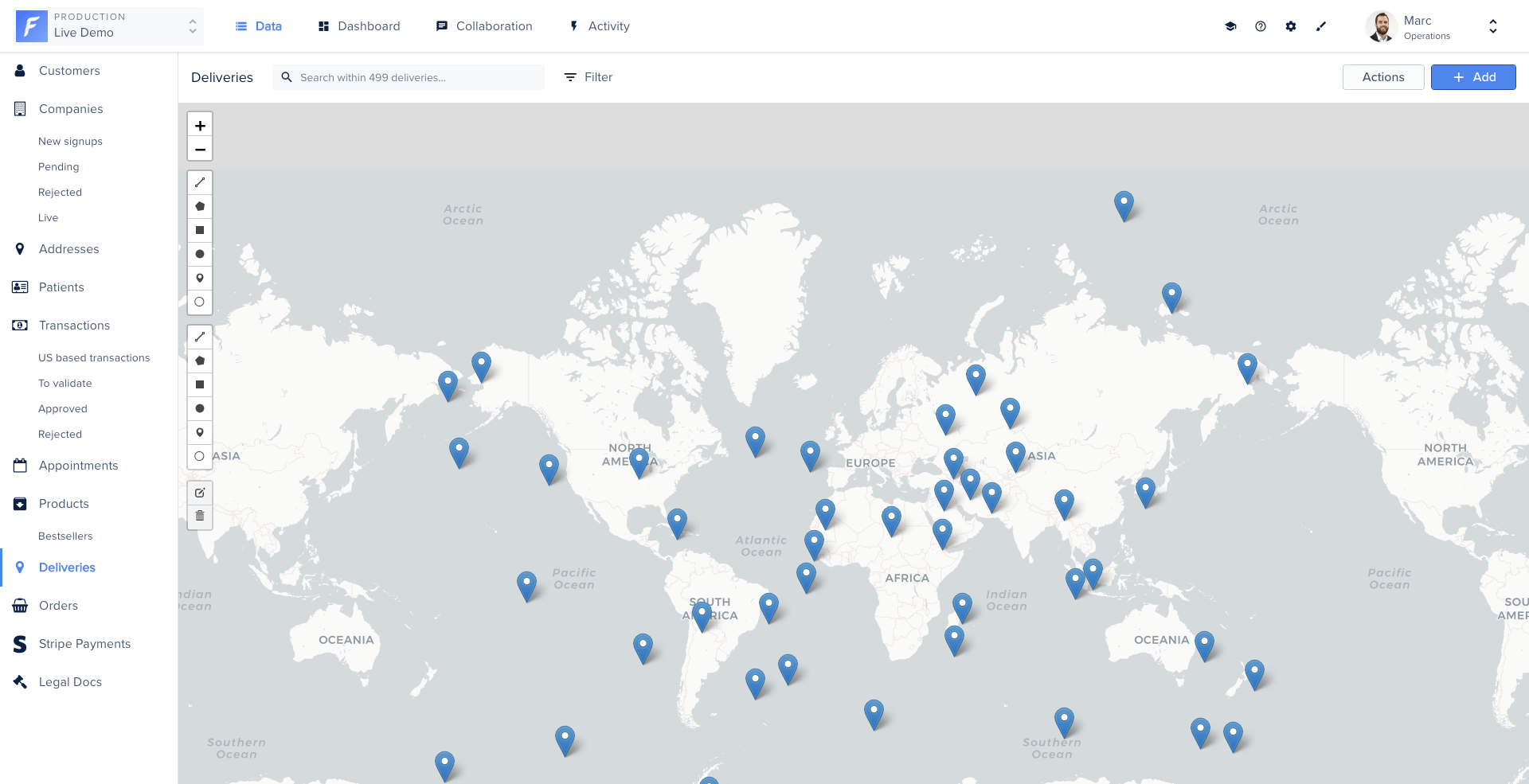
Map view
Displays geo-located records on an interactive map using Leaflet. Clicking a marker opens the corresponding record. New records can be created by placing a marker.
import Component from '@glimmer/component';
import { inject as service } from '@ember/service';
import { action } from '@ember/object';
import { tracked } from '@glimmer/tracking';
import { guidFor } from '@ember/object/internals';
import {
triggerSmartAction,
deleteRecords,
loadExternalStyle,
loadExternalJavascript,
} from 'client/utils/smart-view-utils';
export default class extends Component {
@service router;
@service store;
@tracked map = null;
@tracked loaded = false;
constructor(...args) {
super(...args);
this.loadPlugin();
}
get mapId() {
return `map-${guidFor(this)}`;
}
async loadPlugin() {
loadExternalStyle('//cdnjs.cloudflare.com/ajax/libs/leaflet/1.3.4/leaflet.css');
loadExternalStyle('//cdnjs.cloudflare.com/ajax/libs/leaflet.draw/1.0.4/leaflet.draw.css');
await loadExternalJavascript('//cdnjs.cloudflare.com/ajax/libs/leaflet/1.3.4/leaflet.js');
await loadExternalJavascript('//cdnjs.cloudflare.com/ajax/libs/leaflet.draw/1.0.4/leaflet.draw.js');
this.loaded = true;
this.displayMap();
}
@action
displayMap() {
if (!this.loaded) return;
if (this.map) {
this.map.off();
this.map.remove();
this.map = null;
}
const markers = [];
this.args.records?.forEach(record => {
markers.push([record.get('forest-lat'), record.get('forest-lng'), record.get('id')]);
});
this.map = new L.Map(this.mapId);
const osmUrl = 'https://cartodb-basemaps-{s}.global.ssl.fastly.net/light_all/{z}/{x}/{y}.png';
const osmAttrib = '© <a href="http://www.openstreetmap.org/copyright">OpenStreetMap</a> © <a href="http://cartodb.com/attributions">CartoDB</a>';
const osm = new L.TileLayer(osmUrl, { attribution: osmAttrib });
const drawnItems = new L.FeatureGroup();
this.map.addLayer(drawnItems);
const drawControl = new L.Control.Draw({
draw: { polygon: false, polyline: false, rectangle: false, circle: false, circlemarker: false, marker: true },
edit: { featureGroup: drawnItems },
});
this.map.setView(new L.LatLng(48.8566, 2.3522), 2);
this.map.addLayer(osm);
this.map.addControl(drawControl);
this.map.on(L.Draw.Event.CREATED, event => {
const { layer, layerType: type } = event;
if (type === 'marker') {
const coordinates = event.layer.getLatLng();
const newRecord = this.store.createRecord('forest_delivery', {
'forest-is_delivered': false,
'forest-lng': coordinates.lng,
'forest-lat': coordinates.lat,
});
newRecord.save().then(savedRecord => {
layer.on('click', () => {
this.router.transitionTo(
'project.rendering.data.collection.list.view-edit.details',
this.args.collection.id,
savedRecord.id,
);
});
});
}
this.map.addLayer(layer);
});
markers.forEach(([lat, lng, id]) => {
const marker = L.marker([parseFloat(lat), parseFloat(lng)]).addTo(this.map);
marker.on('click', () => {
this.router.transitionTo(
'project.rendering.data.collection.list.view-edit.details',
this.args.collection.id,
id,
);
});
});
}
@action
triggerSmartAction(...args) {
return triggerSmartAction(this, ...args);
}
@action
deleteRecords(...args) {
return deleteRecords(this, ...args);
}
}
.c-map {
width: 100%;
height: 100%;
z-index: 4;
}
.c-smart-view {
display: flex;
white-space: normal;
position: absolute;
bottom: 0;
left: 0;
right: 0;
top: 0;
background-color: var(--color-beta-surface);
}
<div
id={{this.mapId}}
class='c-map'
{{did-insert this.displayMap}}
{{did-update this.displayMap @records}}
></div>
Gallery view
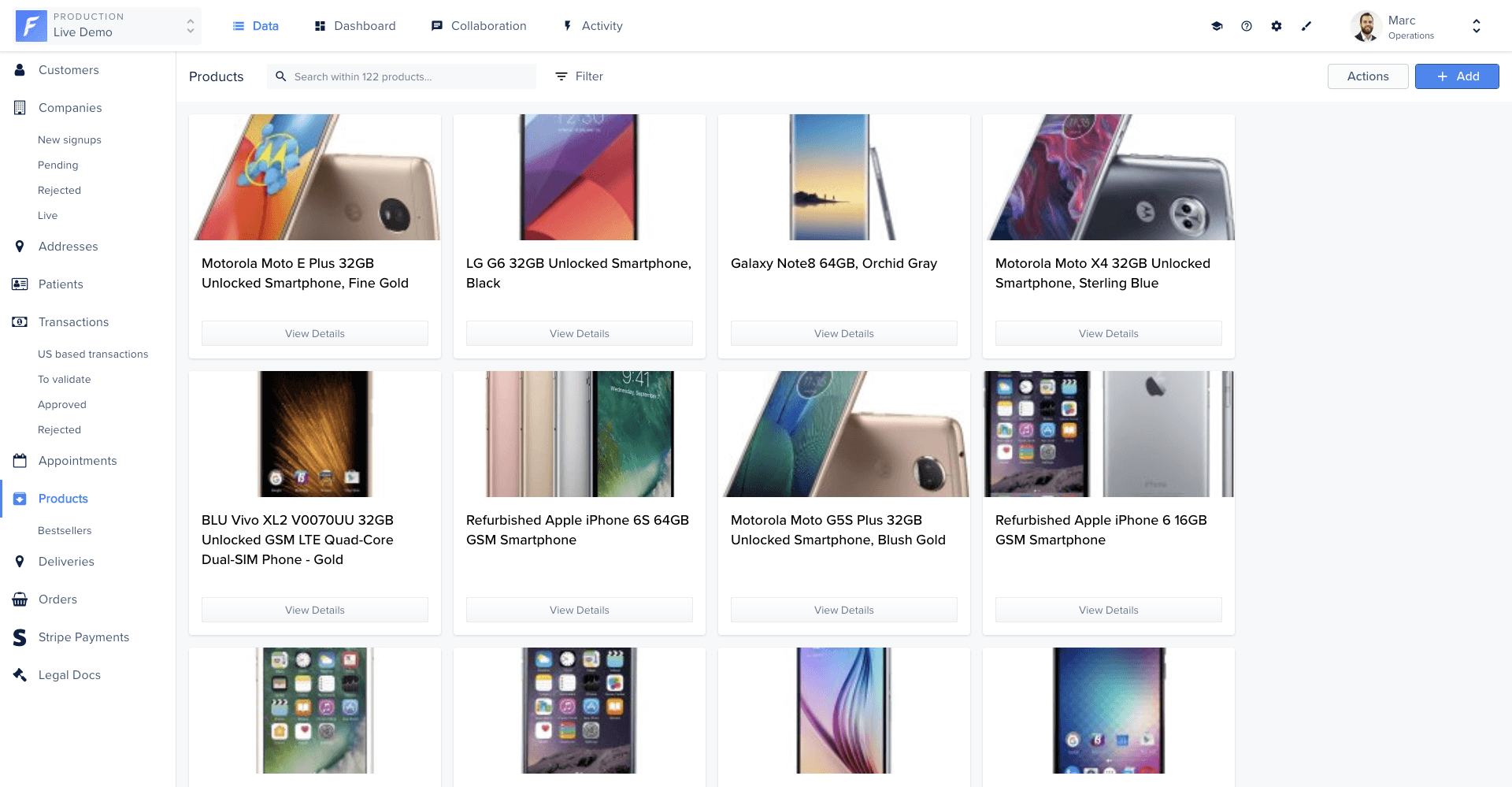
Displays records as a grid of images. Each image links to the corresponding record’s detail page.
import Component from '@glimmer/component';
import { action } from '@ember/object';
import { triggerSmartAction, deleteRecords } from 'client/utils/smart-view-utils';
export default class extends Component {
@action
triggerSmartAction(...args) {
return triggerSmartAction(this, ...args);
}
@action
deleteRecords(...args) {
return deleteRecords(this, ...args);
}
}
.l-gallery-view-container {
flex-grow: 1;
width: 100%;
height: 100%;
overflow: hidden;
position: relative;
}
.c-gallery {
padding: 15px;
overflow-y: auto;
width: 100%;
position: absolute;
left: 0;
top: 0;
bottom: 40px;
}
.c-gallery__image {
height: 182px;
width: 182px;
margin: 3px;
border: 1px solid var(--color-beta-on-surface_border);
border-radius: 3px;
transition: all 0.3s ease-out;
}
.c-gallery__image:hover {
transform: scale(1.05);
}
<div class='l-gallery-view-container'>
<section class='c-gallery'>
{{#each @records as |record|}}
<LinkTo
@route='project.rendering.data.collection.list.view-edit.details'
@models={{array @collection.id record.id}}
class='c-gallery__image-container'
>
<img class='c-gallery__image' src={{record.forest-picture}} />
</LinkTo>
{{/each}}
</section>
<Table::TableFooter
@collection={{@collection}}
@viewList={{@viewList}}
@records={{@records}}
@currentPage={{@currentPage}}
@numberOfPages={{@numberOfPages}}
@recordsCount={{@recordsCount}}
@isLoading={{@isLoading}}
@fetchRecords={{@fetchRecords}}
/>
</div>
Shipping status view
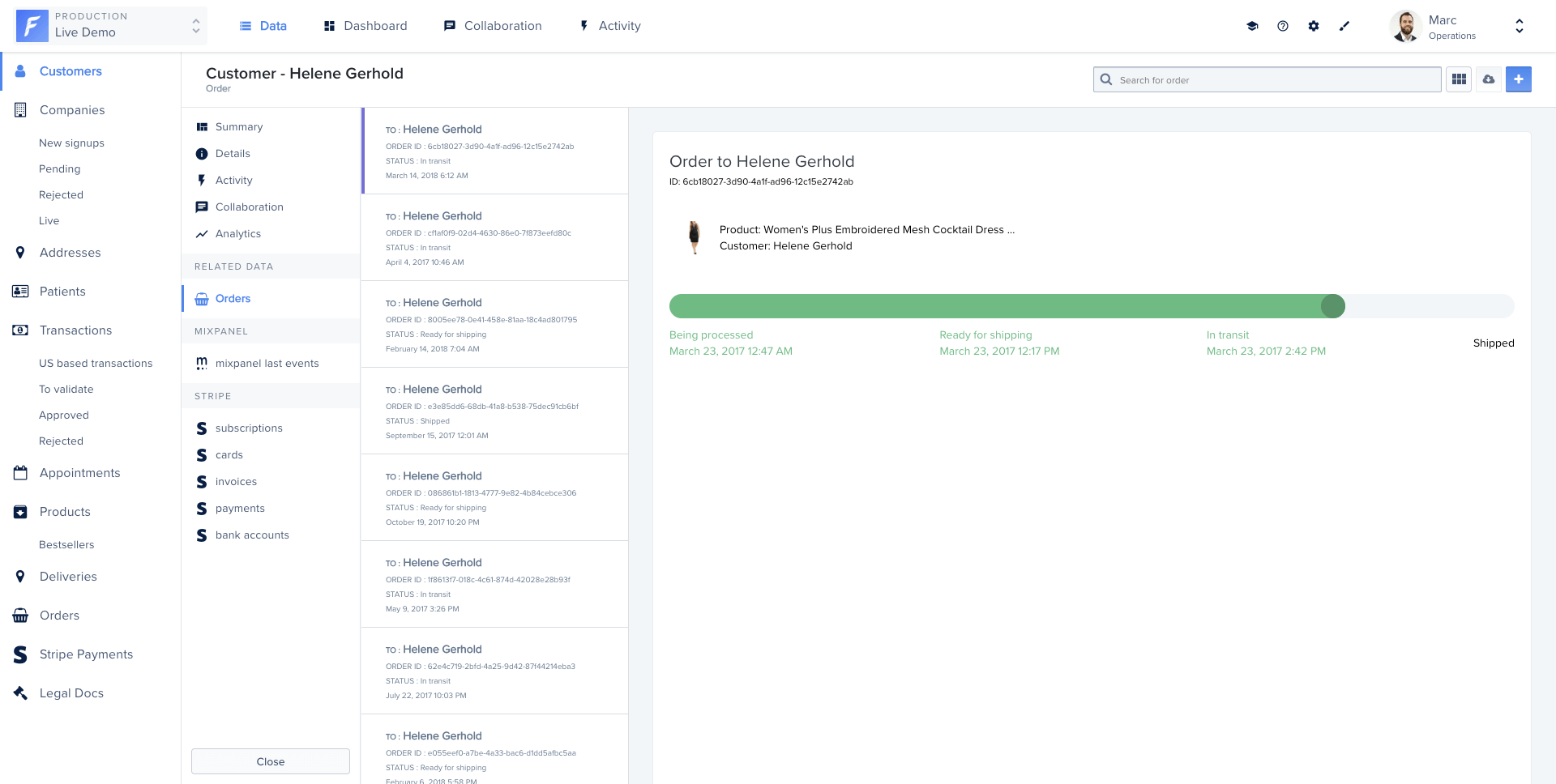
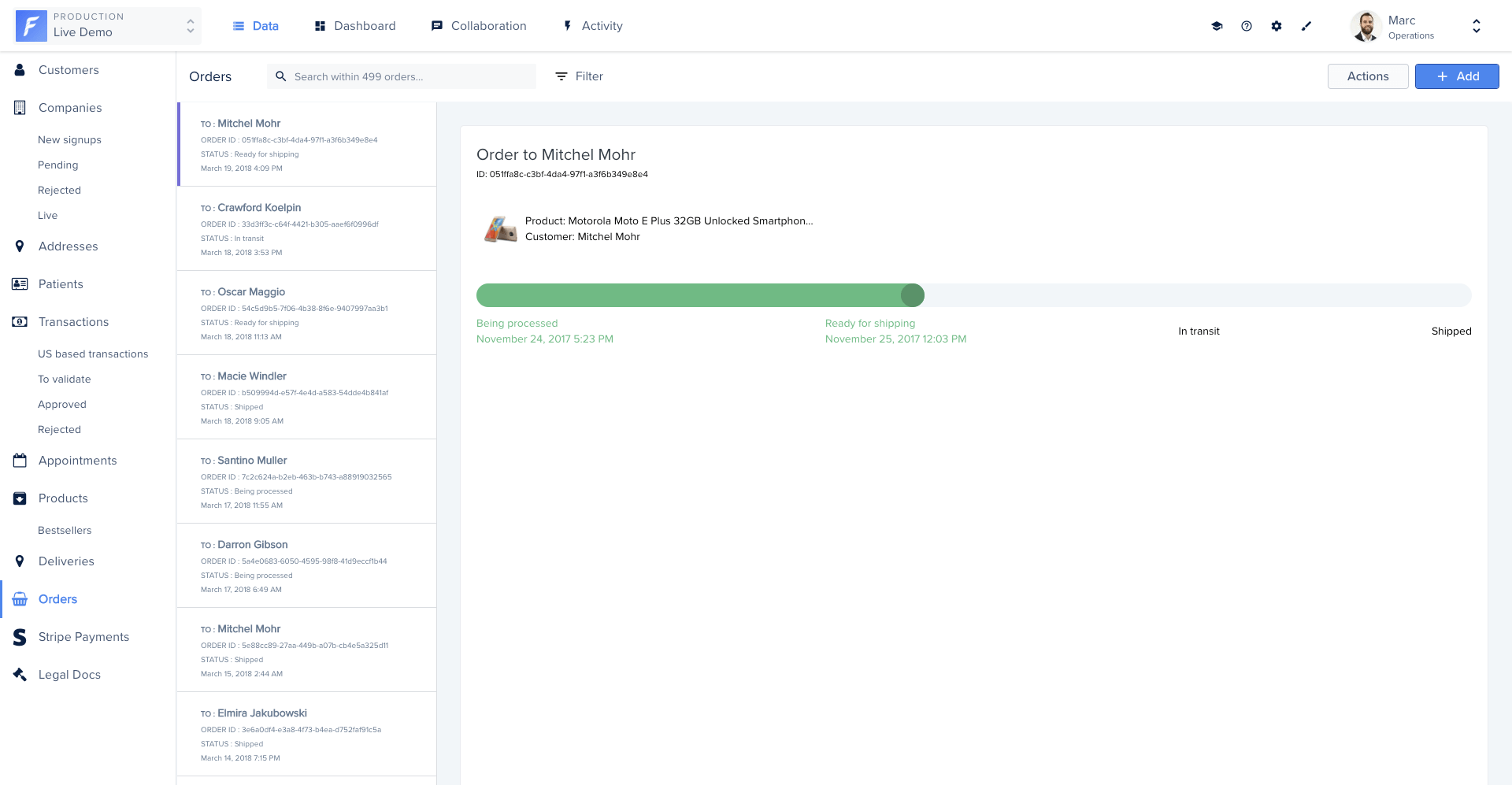
Displays a master-detail layout: a scrollable list of orders on the left and a progress bar card on the right showing the shipping status of the selected order.
import Component from '@glimmer/component';
import { action } from '@ember/object';
import { tracked } from '@glimmer/tracking';
import { triggerSmartAction, deleteRecords } from 'client/utils/smart-view-utils';
export default class extends Component {
@tracked currentRecord = null;
get status() {
switch (this.currentRecord?.get('forest-shipping_status')) {
case 'Being processed': return 'one';
case 'Ready for shipping': return 'two';
case 'In transit': return 'three';
case 'Shipped': return 'four';
default: return null;
}
}
@action
setDefaultCurrentRecord() {
if (!this.currentRecord) {
this.currentRecord = this.args.records.firstObject;
}
}
@action
selectRecord(record) {
this.currentRecord = record;
}
@action
triggerSmartAction(...args) {
return triggerSmartAction(this, ...args);
}
@action
deleteRecords(...args) {
return deleteRecords(this, ...args);
}
}
<div class='wrapper-view' {{did-insert this.setDefaultCurrentRecord}}>
<div class='wrapper-list'>
{{#each @records as |record|}}
<a href='#' {{on 'click' (fn this.selectRecord record)}}>
<div class='list--item {{if (eq this.currentRecord record) "selected"}}'>
<div class='list--item__values-left'>
<h3><span>to:</span>
{{record.forest-customer.forest-firstname}}
{{record.forest-customer.forest-lastname}}</h3>
<p><span>order ID</span>: {{record.id}}</p>
<p><span>status</span>: {{record.forest-shipping_status}}</p>
</div>
</div>
</a>
{{/each}}
</div>
<div class='wrapper-card'>
<div class='card--title'>
<h2>Order to
{{this.currentRecord.forest-customer.forest-firstname}}
{{this.currentRecord.forest-customer.forest-lastname}}</h2>
<small>ID: {{this.currentRecord.id}}</small>
</div>
<div class='gaugebar--bar'>
<div class='gaugebar--bar__active {{this.status}}'></div>
</div>
</div>
</div>