The RPC datasource connects Forest back-ends to each other over RPC (Remote Procedure Call). Use it to expose a remote data source in your back-office, or to split one back-end across multiple services (microservices) that a main back-end aggregates into a single admin panel.
Node.js
In Node.js, the RPC datasource connects to a remote data source and exposes its data and operations in your back-office.
npm install @forestadmin-experimental/datasource-rpc
import { createAgent } from '@forestadmin/agent';
import { createRpcDataSource } from '@forestadmin-experimental/datasource-rpc';
const agent = createAgent(options);
agent.addDataSource(
createRpcDataSource({
url: process.env.RPC_SERVER_URL,
}),
);
Ruby (distributed back-ends)
In Ruby, the RPC datasource lets you distribute your Forest back-end across multiple microservices. Each service runs its own RPC back-end, and a main back-end aggregates them into a unified admin panel.
Why use RPC?
- Microservices architecture: your application is split into multiple services, each owning its data.
- Team isolation: each team manages their own Forest configuration.
- Independent deployment: update one service without redeploying the entire admin panel.
- Scalability: distribute load across multiple agents.
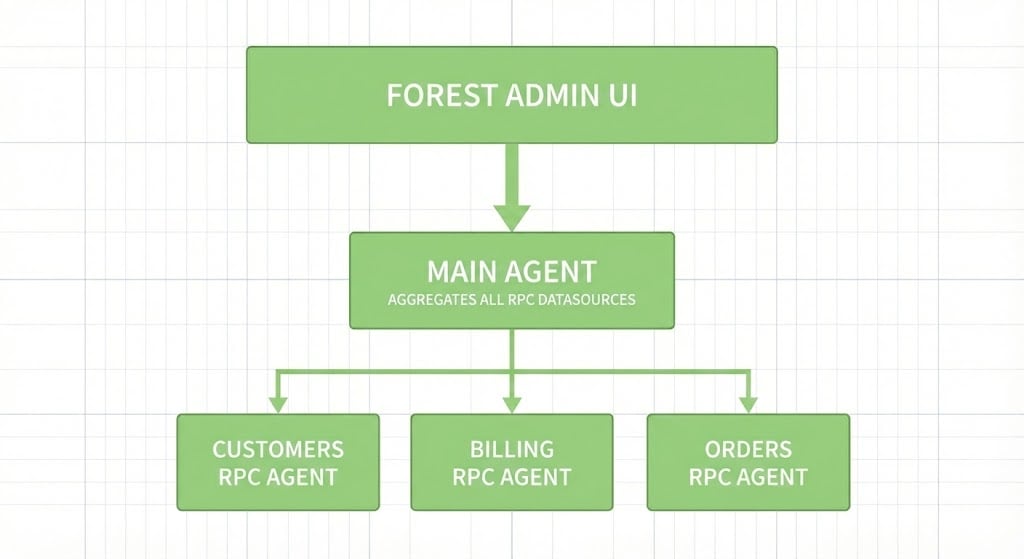
Main back-end
The main back-end aggregates multiple RPC back-ends into a single Forest interface. It behaves exactly like a classic back-end with multiple datasources: once connected, you can define relations across datasources transparently.
# Gemfile
gem 'forest_admin_datasource_rpc'
# app/lib/forest_admin_rails/create_agent.rb
module ForestAdminRails
class CreateAgent
def self.setup!
@agent = ForestAdminAgent::Builder::AgentFactory.instance
# Add RPC datasources
@agent.add_datasource(
ForestAdminDatasourceRpc.build(uri: 'http://customers-app:3002')
)
@agent.add_datasource(
ForestAdminDatasourceRpc.build(
uri: 'http://billing-app:3003',
auth_secret: 'YOUR-SHARED-AUTH-SECRET'
)
)
# You can also add local datasources
@agent.add_datasource(ForestAdminDatasourceMongoid.build)
@agent.use(ForestAdminDatasourceRpc::ReconciliateRpc)
@agent.build
end
end
end
The auth_secret option is optional. If not specified, it defaults to your Forest project’s auth_secret. Override it to use a different shared secret for RPC communication.
The ReconciliateRpc plugin must be added in the main back-end. It relies on collection names matching across all back-ends, so if you rename collections in your RPC back-ends, keep all back-ends synchronized.
Introspection caching
By default, the main back-end introspects each RPC back-end at startup. Caching the introspection schema makes startup faster, lets the main back-end boot even if an RPC back-end is temporarily unavailable, and supports asynchronous deployments. RPC back-ends automatically generate a .forestadmin-rpc-schema.json file in development mode; pass it when adding a datasource:
schema = JSON.parse(
File.read(Rails.root.join('.forestadmin-rpc-schema.json')),
symbolize_names: true
)
@agent.add_datasource(
ForestAdminDatasourceRpc.build(
uri: 'http://customers-app:3002',
introspection: schema
)
)
Regenerate the cached schema when an RPC back-end’s collections change.
RPC back-end
An RPC back-end exposes its collections to the main back-end via the RPC protocol.
# Gemfile
gem 'forest_admin_rpc_agent'
Run the installation command with the auth_secret from your main Forest project:
forest_admin_rpc_agent install YOUR_AUTH_SECRET
This creates config/initializers/forest_admin_rpc_agent.rb, lib/forest_admin_rpc_agent/create_rpc_agent.rb, and mounts the RPC routes in config/routes.rb. The generated back-end looks like:
module ForestAdminRpcAgent
class CreateRpcAgent
def self.setup!
datasource = ForestAdminDatasourceActiveRecord::Datasource.new(Rails.env.to_sym)
@agent = ForestAdminRpcAgent::Agent.instance.add_datasource(datasource)
@agent.build
end
end
end
You can use all standard customization methods (computed fields, actions, segments, etc.) on your RPC back-end collections.
Cross-RPC relations
When an RPC back-end needs to reference collections from another RPC back-end, import them by adding an RPC datasource that references the other back-end, then use mark_collections_as_rpc: true to indicate those collections are provisioned elsewhere.
module ForestAdminRpcAgent
class CreateRpcAgent
def self.setup!
# 1. Local datasource
datasource = ForestAdminDatasourceActiveRecord::Datasource.new(Rails.env.to_sym)
@agent = ForestAdminRpcAgent::Agent.instance.add_datasource(datasource)
# 2. Remote RPC datasource, marked as RPC
@agent.add_datasource(
ForestAdminDatasourceRpc.build(uri: 'http://customers-app:3002'),
mark_collections_as_rpc: true
)
# 3. Cross-RPC relations (here in the Billing agent:
# 'Invoice' is local, 'User' is imported from the Customers agent)
@agent.customize_collection('Invoice') do |collection|
collection.add_many_to_one_relation(
'user', 'User', { foreign_key: 'user_id', foreign_key_target: 'id' }
)
end
@agent.customize_collection('User') do |collection|
collection.add_one_to_many_relation(
'invoices', 'Invoice', { origin_key: 'user_id', origin_key_target: 'id' }
)
end
@agent.build
end
end
end
For finer control over which collections are marked, call mark_collections_as_rpc manually:
# Mark specific collections
@agent.mark_collections_as_rpc('User', 'Address')
# Or use a regex to match a pattern of collections
@agent.mark_collections_as_rpc(/^admin_/)
Supported cross-RPC relation types: add_many_to_one_relation, add_one_to_many_relation, add_one_to_one_relation, and add_many_to_many_relation.
Source code
This connector is open source. Browse the code or contribute on GitHub: