What is a Smart Field?
A field that displays a computed value in your collection.
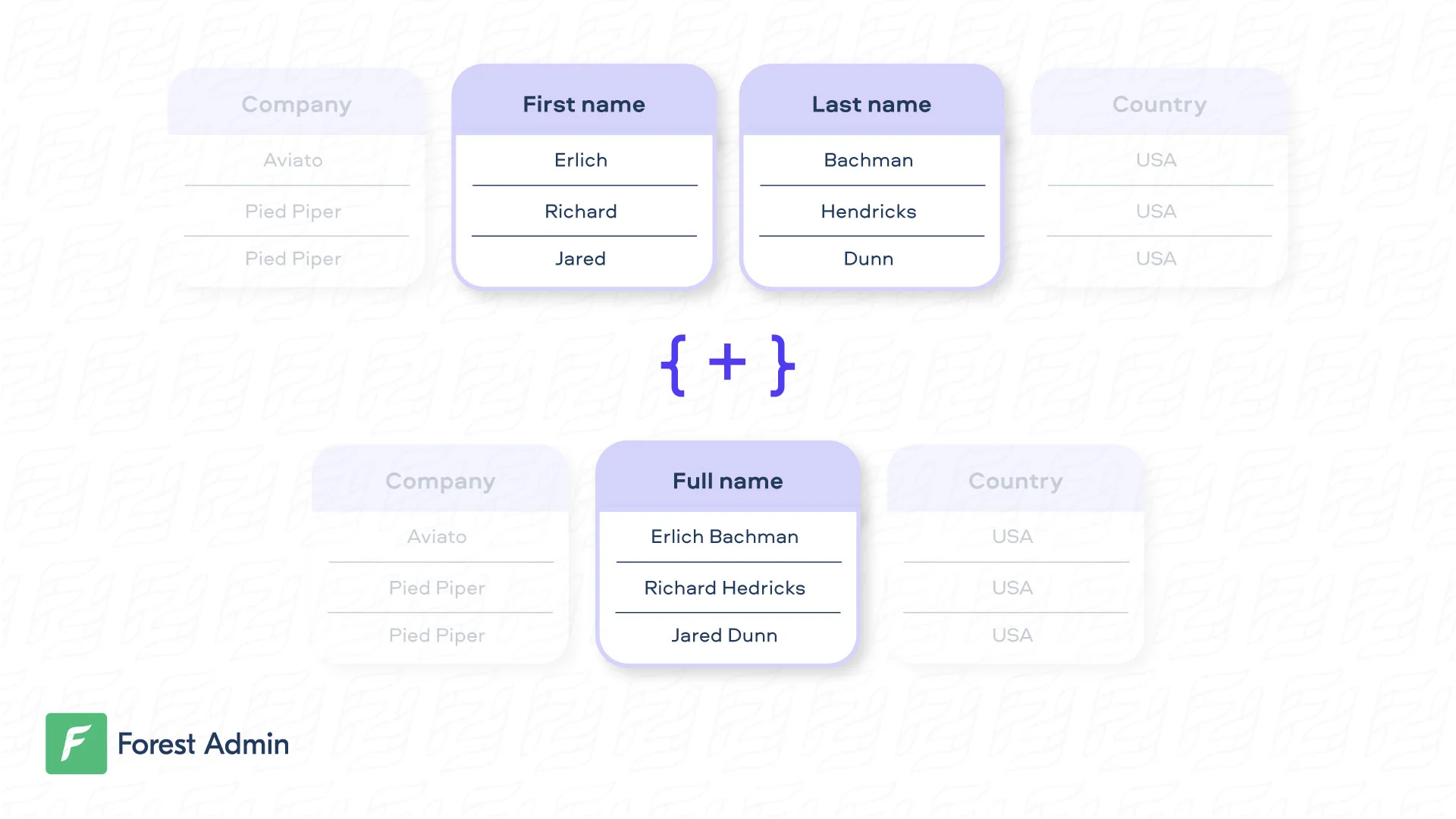
A Smart Field is a column that displays processed-on-the-fly data. It can be as simple as concatenating attributes to make them human friendly, or more complex (e.g. total of orders).
Creating a Smart Field
SQL
Mongoose
Rails
Django
Laravel
On our Live Demo, the very simple Smart Field fullname is available on the customers collection.const { collection } = require('forest-express-sequelize');
collection('customers', {
fields: [
{
field: 'fullname',
type: 'String',
get: (customer) => {
return customer.firstname + ' ' + customer.lastname;
},
},
],
});
Very often, the business logic behind the Smart Field is more complex and must be asynchronous. To do that, please have a look at this section. On our Live Demo, the very simple Smart Field fullname is available on the customers collection.const { collection } = require('forest-express-mongoose');
collection('customers', {
fields: [
{
field: 'fullname',
type: 'String',
get: (customer) => {
return customer.firstname + ' ' + customer.lastname;
},
},
],
});
Very often, the business logic behind the Smart Field is more complex and must be asynchronous. To do that, please have a look at this section. On our Live Demo, the very simple Smart Field fullname is available on the Customer collection.class Forest::Customer
include ForestLiana::Collection
collection :Customer
field :fullname, type: 'String' do
"#{object.firstname} #{object.lastname}"
end
end
Very often, the business logic behind the Smart Field is more complex and must interact with the database. Here’s an example with the Smart Field full_address on the Customer collection.class Forest::Customer
include ForestLiana::Collection
collection :Customer
field :full_address, type: 'String' do
address = Address.find_by(customer_id: object.id)
"#{address[:address_line_1]} #{address[:address_line_2]} #{address[:address_city]} #{address[:country]}"
end
end
On our Live Demo, the very simple Smart Field fullname is available on the Customer collection.Ensure the file app/forest/__init__.py exists and contains the import of the previous defined class :
On our Live Demo, the very simple Smart Field fullname is available on the Customer model.Very often, the business logic behind the Smart Field is more complex and must interact with the database. Here’s an example with the Smart Field full_address on the Customer model.The collection name must be the same as the model name.
Updating a Smart Field
SQL
Mongoose
Rails
Django
By default, your Smart Field is considered as read-only. If you want to update a Smart Field, you just need to write the logic to “unzip” the data. Note that the set method should always return the object it’s working on. In the example hereunder, the customer object is returned including only the modified data.const { collection } = require('forest-express-sequelize');
collection('customers', {
fields: [
{
field: 'fullname',
type: 'String',
get: (customer) => {
return customer.firstname + ' ' + customer.lastname;
},
set: (customer, fullname) => {
let names = fullname.split(' ');
customer.firstname = names[0];
customer.lastname = names[1];
// Don't forget to return the customer.
return customer;
},
},
],
});
Working with the actual record can be done this way:const { collection, ResourceGetter } = require('forest-express-sequelize');
const { customers } = require('../models');
collection('customers', {
fields: [
{
field: 'fullname',
type: 'String',
get: (customer) => {
return customer.firstname + ' ' + customer.lastname;
},
set: async (customer, fullname) => {
const customerBeforeUpdate = await customers.findOne({
where: { id: customer.id },
});
const names = fullname.split(' ');
customer.firstname = `${names[0]} ${customerBeforeUpdate.pseudo}`;
return customer;
},
},
],
});
For security reasons, the fullname Smart field will remain read-only, even after you implement the set method. To edit it, disable read-only mode in the field settings.
By default, your Smart Field is considered as read-only. If you want to update a Smart Field, you just need to write the logic to “unzip” the data. Note that the set method should always return the object it’s working on. In the example hereunder, the customer record is returned.const { collection } = require('forest-express-mongoose');
collection('customers', {
fields: [
{
field: 'fullname',
type: 'String',
get: (customer) => {
return customer.firstname + ' ' + customer.lastname;
},
set: (customer, fullname) => {
let names = fullname.split(' ');
customer.firstname = names[0];
customer.lastname = names[1];
// Don't forget to return the customer.
return customer;
},
},
],
});
Working with the actual record can be done this way:const { collection, ResourceGetter } = require('forest-express-mongoose');
const { customers } = require('../models');
collection('customers', {
fields: [
{
field: 'fullname',
type: 'String',
get: (customer) => {
return customer.firstname + ' ' + customer.lastname;
},
set: async (customer, fullname) => {
const customerBeforeUpdate = await customers.findById(customer.id);
const names = fullname.split(' ');
customer.firstname = `${names[0]} ${customerBeforeUpdate.pseudo}`;
return customer;
},
},
],
});
For security reasons, the fullname Smart field will remain read-only, even after you implement the set method. To edit it, disable read-only mode in the field settings.
By default, your Smart Field is considered as read-only. If you want to update a Smart Field, you just need to write the logic to “unzip” the data. Note that the set method should always return the object it’s working on. In the example hereunder, the user_params is returned is returned including only the modified data.class Forest::Customer
include ForestLiana::Collection
collection :Customer
set_fullname = lambda do |user_params, fullname|
fullname = fullname.split
user_params[:firstname] = fullname.first
user_params[:lastname] = fullname.last
# Returns a hash of the updated values you want to persist.
user_params
end
field :fullname, type: 'String', set: set_fullname do
"#{object.firstname} #{object.lastname}"
end
end
For security reasons, the fullname Smart field will remain read-only, even after you implement the set method. To edit it, disable read-only mode in the field settings.
By default, your Smart Field is considered as read-only. If you want to update a Smart Field, you just need to write the logic to “unzip” the data. Note that the set method should always return the object it’s working on. In the example hereunder, the customer object is returned including only the modified data.
Searching, Sorting and Filtering on a Smart Field
To perform a search on a Smart Field, you also need to write the logic to “unzip” the data, then the search query which is specific to your zipping. In the example hereunder, the firstname and lastname are searched separately after having been unzipped.
const { collection } = require('forest-express-sequelize');
const models = require('../models/');
const _ = require('lodash');
const Op = models.objectMapping.Op;
collection('customers', {
fields: [
{
field: 'fullname',
type: 'String',
get: (customer) => {
return customer.firstname + ' ' + customer.lastname;
},
search: function (query, search) {
let split = search.split(' ');
var searchCondition = {
[Op.and]: [
{ firstname: { [Op.like]: `%${split[0]}%` } },
{ lastname: { [Op.like]: `%${split[1]}%` } },
],
};
query.where[Op.and][0][Op.or].push(searchCondition);
return query;
},
},
],
});
const { collection } = require('forest-express-mongoose');
const models = require('../models/');
const _ = require('lodash');
collection('customers', {
fields: [{
field: 'fullname',
type: 'String',
get: (customer) => {
return customer.firstname + ' ' + customer.lastname;
},
search(search) {
let names = search.split(' ');
return {
firstname: names[0],
lastname: names[1]
};
}
}]
});
class Forest::Customer
include ForestLiana::Collection
collection :Customer
search_fullname = lambda do |query, search|
firstname, lastname = search.split
# Injects your new filter into the WHERE clause.
query.where_clause.send(:predicates)[0] << " OR (firstname = '#{firstname}' AND lastname = '#{lastname}')"
query
end
field :fullname, type: 'String', set: set_fullname, search: search_fullname do
"#{object.firstname} #{object.lastname}"
end
end
Filtering
This feature is only available on agents version 6.7+ (version 6.2+ for Rails).
To perform a filter on a Smart Field, you need to write the filter query logic, which is specific to your use case.
In the example hereunder, the fullname is filtered by checking conditions on the firstname and lastname depending on the filter operator selected.
const { collection } = require('forest-express-sequelize');
const models = require('../models/');
const { Op } = models.Sequelize;
collection('customers', {
fields: [
{
field: 'fullname',
isFilterable: true,
type: 'String',
get: (customer) => {
return customer.firstname + ' ' + customer.lastname;
},
filter({ condition, where }) {
const firstWord = !!condition.value && condition.value.split(' ')[0];
const secondWord = !!condition.value && condition.value.split(' ')[1];
switch (condition.operator) {
case 'equal':
return {
[Op.and]: [
{ firstname: firstWord },
{ lastname: secondWord || '' },
],
};
case 'ends_with':
if (!secondWord) {
return {
lastName: { [Op.like]: `%${firstWord}` },
};
}
return {
[Op.and]: [
{ firstName: { [Op.like]: `%${firstWord}` } },
{ lastName: secondWord },
],
};
// ... And so on with the other operators not_equal, starts_with, etc.
default:
return null;
}
},
},
],
segments: [],
});
const { collection } = require('forest-express-mongoose');
const models = require('../models');
collection('customer', {
actions: [],
fields: [
{
field: 'fullName',
type: 'String',
isFilterable: true,
get: (customer) => {
return customer.firstname + ' ' + customer.lastname;
},
filter({ condition, where }) {
const firstWord = !!condition.value && condition.value.split(' ')[0];
const secondWord = !!condition.value && condition.value.split(' ')[1];
switch (condition.operator) {
case 'equal':
return {
$and: [{ firstname: firstWord }, { lastname: secondWord || '' }],
};
case 'ends_with':
if (!secondWord) {
return {
lastname: { $regex: `.*${firstWord}` },
};
}
return {
$and: [
{ firstname: { $regex: `.*${firstWord}` } },
{ lastname: secondWord },
],
};
// ... And so on with the other operators not_equal, starts_with, etc.
default:
return null;
}
},
},
],
segments: [],
});
class Forest::Customer
include ForestLiana::Collection
collection :Customer
filter_fullname = lambda do |condition, where|
first_word = condition['value'] && condition['value'].split[0]
second_word = condition['value'] && condition['value'].split[1]
case condition['operator']
when 'equal'
"firstname = '#{first_word}' AND lastname = '#{second_word}'"
when 'ends_with'
if second_word.nil?
"lastname LIKE '%#{first_word}'"
else
"firstname LIKE '%#{first_word}' AND lastname = '#{second_word}'"
end
# ... And so on with the other operators not_equal, starts_with, etc.
end
end
field :fullname, type: 'String', is_read_only: false, is_required: true, is_filterable: true, filter: filter_fullname do
"#{object.firstname} #{object.lastname}"
end
end
Make sure you set the option isFilterable: true in the field definition of your code. Then, you will be able to toggle the “Filtering enabled” option in the browser, in your Fields Settings.
Sorting
Sorting on a Smart Field is not natively supported in Forest. However you can check out those guides:
Available Field Options
Here are the list of available options to customize your Smart Field:
| Name | Type | Description |
|---|
| field | string | The name of your Smart Field. |
| type | string | Type of your field. Can be Boolean, Date, Json,Dateonly, Enum, File, Number, ['String'] or String . |
| enums | array of strings | (optional) Required only for the Enum type. This is where you list all the possible values for your input field. |
| description | string | (optional) Add a description to your field. |
| reference | string | (optional) Configure the Smart Field as a Smart Relationship. |
| isReadOnly | boolean | (optional) If true, the Smart Field won’t be editable in the browser. Default is true if there’s no set option declared. |
| isRequired | boolean | (optional) If true, your Smart Field will be set as required in the browser. Default is false. |
To optimize your smart field performance, we recommend using a mechanism of batching and caching data requests.
Implement them using the DataLoader which is a generic utility to be used as part of your application’s data fetching layer to provide a simplified and consistent API over various remote data sources.
Smart field declaration
const DataLoader = require('dataloader');
const authorLoader = new DataLoader(async (authorKeys) => {
const authors = await users.findAll({
where: { id: authorKeys },
});
const authorsById = new Map(authors.map((user) => [user.id, user]));
return authorKeys.map((authorKey) => authorsById.get(authorKey));
});
collection('posts', {
actions: [],
fields: [
{
field: 'author_name',
type: 'String',
get: async (record) => {
const author = await authorLoader.load(record.authorKey);
return author.name;
},
},
],
segments: [],
});
const { collection } = require('forest-express-mongoose');
const { Address } = require('../models');
const Dataloader = require('dataloader');
const addressLoader = new Dataloader((customerIds) => {
const addresses = await models.addresses.find({
customer_id: {
$in: customerIds
}
});
const addressesByCustomerId = new Map(addresses.map(
address => [address.customer_id, address]
));
return customerIds.map(customerId => addressesByCustomerId.get(customerId));
})
collection('customers', {
fields: [{
field: 'full_address',
type: 'String',
get: (customer) => {
return addressLoader.load(customer.id)
.then((address) => {
return address.address_line_1 + '\n' +
address.address_line_2 + '\n' +
address.address_city + ' ' + address.country;
});
}
}]
});