

Creating an API-based Chart
Sometimes, charts data are complicated and closely tied to your business. Forest allows you to code how the chart is computed. Choose API as the data source when configuring your chart..png?fit=max&auto=format&n=XG_FfWf8cKiyLgEH&q=85&s=ff38cb3bedabcae2001847a9ed6c125c)
Value API-based Chart
On our Live Demo, we have aMRR value chart which computes our Monthly Recurring Revenue. This chart queries the Stripe API to get all charges made in the current month (in March for this example).
- SQL
- Mongoose
- Rails
When serializing the data, we use the
Liana.StatSerializer() serializer. Check the value syntax below.{ value: <number> }
const P = require('bluebird');
const express = require('express');
const router = express.Router();
const Liana = require('forest-express-sequelize');
const stripe = require('stripe')(process.env.STRIPE_SECRET_KEY);
const moment = require('moment');

...

router.post('/stats/mrr', (req, res) => {
  let mrr = 0;

  let from = moment.utc('2018-03-01').unix();
  let to = moment.utc('2018-03-31').unix();

  return stripe.charges
    .list({
      created: { gte: from, lte: to }
    })
    .then((response) => {
      return P.each(response.data, (charge) => {
        mrr += charge.amount;
      });
    })
    .then(() => {
      let json = new Liana.StatSerializer({
        value: mrr
      }).perform();

      res.send(json);
    });
});

...

module.exports = router;
When serializing the data, we use the
Liana.StatSerializer() serializer. Check the value syntax below.{ value: <number> }
const P = require('bluebird');
const express = require('express');
const router = express.Router();
const Liana = require('forest-express-mongoose');
const stripe = require('stripe')(process.env.STRIPE_SECRET_KEY);
const moment = require('moment');

...

router.post('/stats/mrr', (req, res) => {
  let mrr = 0;

  let from = moment.utc('2018-03-01').unix();
  let to = moment.utc('2018-03-31').unix();

  return stripe.charges
    .list({
      created: { gte: from, lte: to }
    })
    .then((response) => {
      return P.each(response.data, (charge) => {
        mrr += charge.amount;
      });
    })
    .then(() => {
      let json = new Liana.StatSerializer({
        value: mrr
      }).perform();

      res.send(json);
    });
});

...

module.exports = router;
When serializing the data, we use the
serialize_model() method. Check the value syntax below.{ value: <number> }
Rails.application.routes.draw do
  # MUST be declared before the mount ForestLiana::Engine.
  namespace :forest do
    post '/stats/mrr' => 'charts#mrr'
  end

  mount ForestLiana::Engine => '/forest'
end
class Forest::ChartsController < ForestLiana::ApplicationController
  def mrr
    mrr = 0

    from = Date.parse('2018-03-01').to_time(:utc).to_i
    to = Date.parse('2018-03-31').to_time(:utc).to_i

    Stripe::Charge.list({
      created: { gte: from, lte: to },
      limit: 100
    }).each do |charge|
      mrr += charge.amount / 100
    end

    stat = ForestLiana::Model::Stat.new({ value: mrr })
    render json: serialize_model(stat)
  end
end
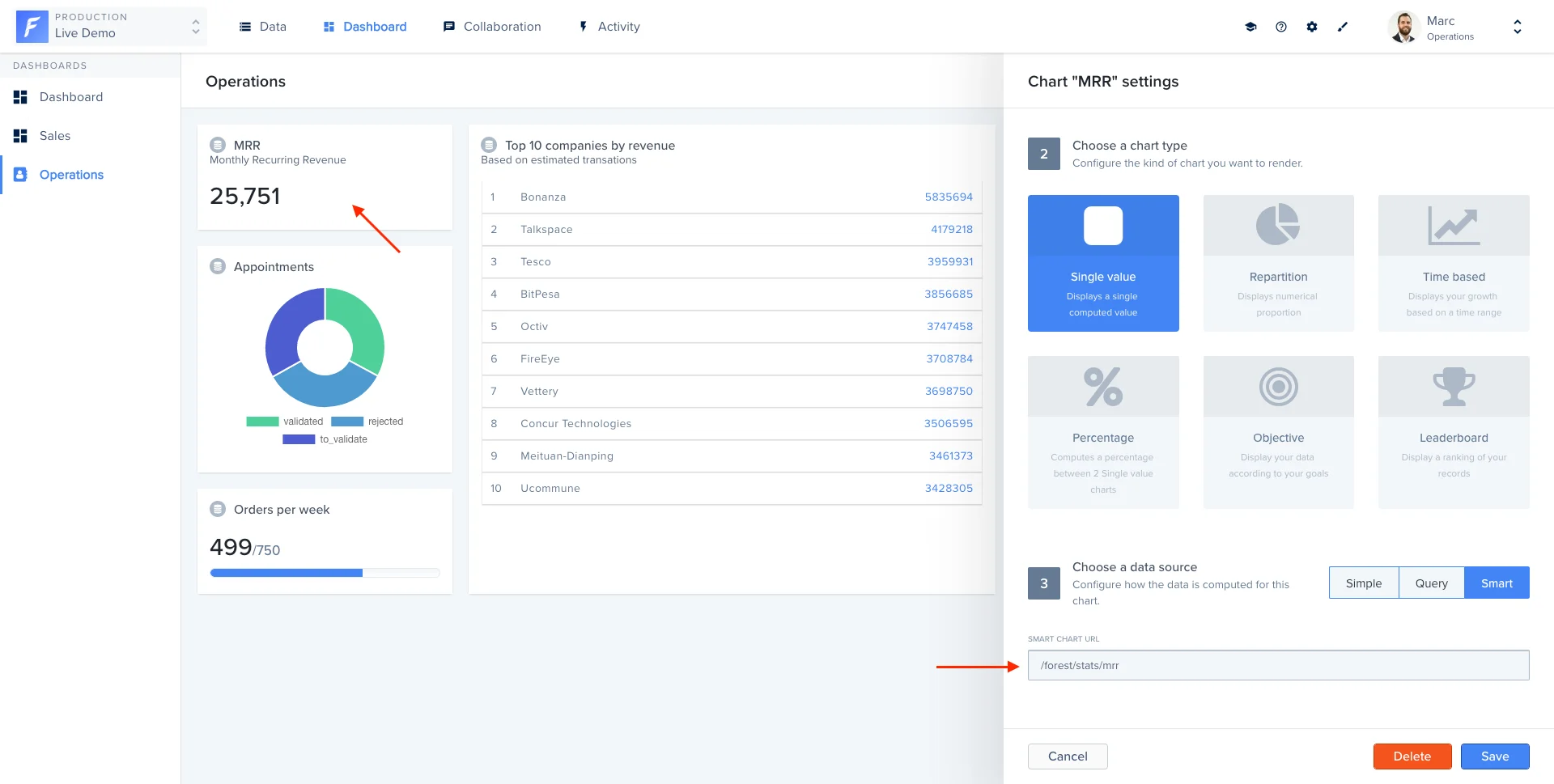
Repartition API-based Chart
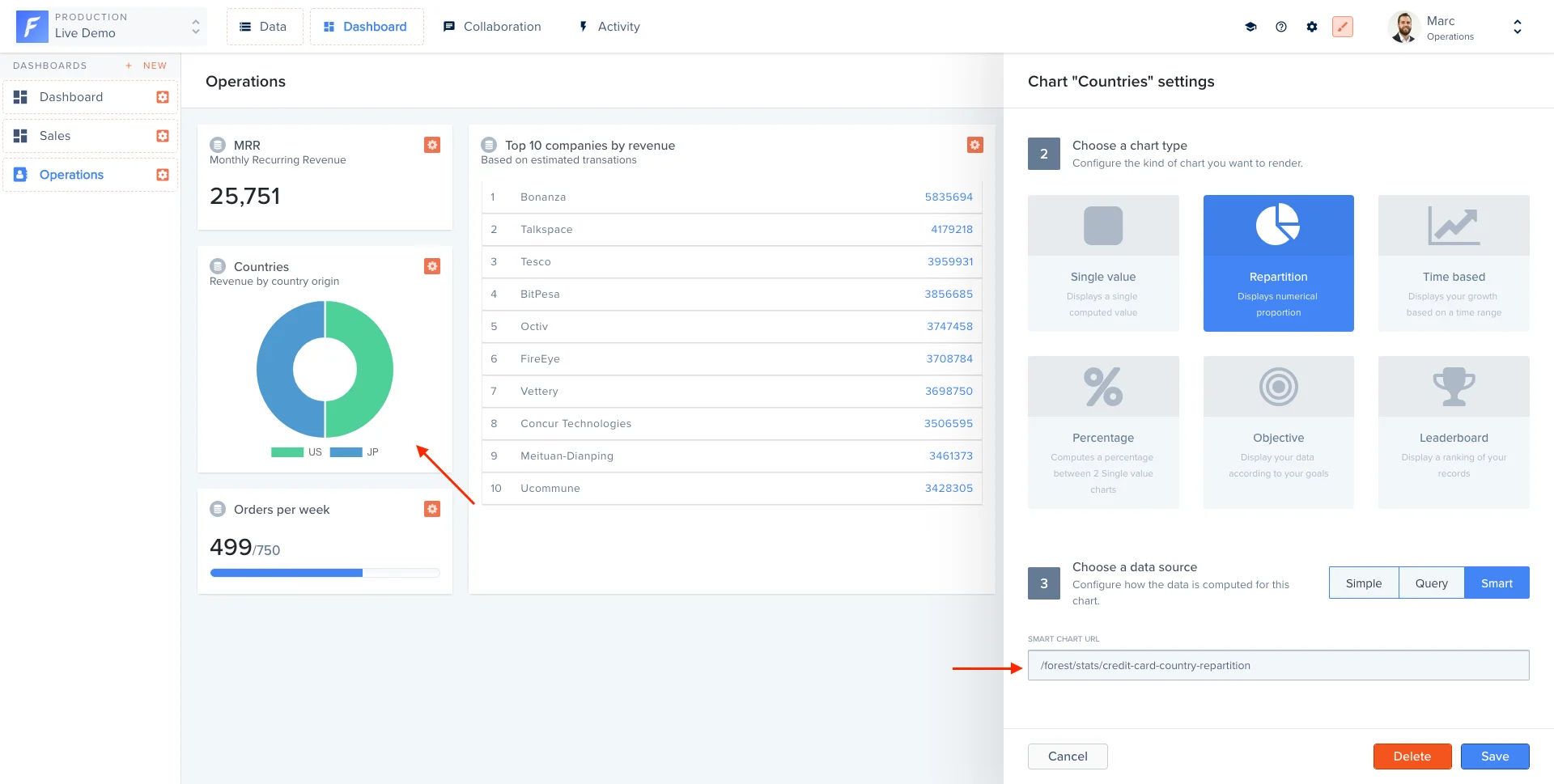
On our Live Demo, we have aCharges repartition chart which shows a repartition chart distributed by credit card country. This chart queries the Stripe API to get all charges made in the current month (in March for this example) and check the credit card country.
- SQL
- Mongoose
- Rails
- Laravel
When serializing the data, we use the
Liana.StatSerializer() serializer. Check the value syntax below.{
value: [{
key: <string> ,
value: <number>
}, {
key: <string> ,
value: <number>
}, …]
}
const _ = require('lodash');
const P = require('bluebird');
const express = require('express');
const router = express.Router();
const Liana = require('forest-express-sequelize');
const stripe = require('stripe')(process.env.STRIPE_SECRET_KEY);
const moment = require('moment');
router.post(
'/stats/credit-card-country-repartition',
Liana.ensureAuthenticated,
(req, res) => {
let repartition = [];
let from = moment.utc('2018-03-01').unix();
let to = moment.utc('2018-03-20').unix();
return stripe.charges
.list({
created: { gte: from, lte: to },
})
.then((response) => {
return P.each(response.data, (charge) => {
let country = charge.source.country || 'Others';
let entry = _.find(repartition, { key: country });
if (!entry) {
repartition.push({ key: country, value: 1 });
} else {
entry.value++;
}
});
})
.then(() => {
let json = new Liana.StatSerializer({
value: repartition,
}).perform();
res.send(json);
});
}
);
module.exports = router;
When serializing the data, we use the
Liana.StatSerializer() serializer. Check the value syntax below.{
value: [{
key: <string> ,
value: <number>
}, {
key: <string> ,
value: <number>
}, …]
}
const _ = require('lodash');
const P = require('bluebird');
const express = require('express');
const router = express.Router();
const Liana = require('forest-express-mongoose');
const stripe = require('stripe')(process.env.STRIPE_SECRET_KEY);
const moment = require('moment');
router.post(
'/stats/credit-card-country-repartition',
Liana.ensureAuthenticated,
(req, res) => {
let repartition = [];
let from = moment.utc('2018-03-01').unix();
let to = moment.utc('2018-03-20').unix();
return stripe.charges
.list({
created: { gte: from, lte: to },
})
.then((response) => {
return P.each(response.data, (charge) => {
console.log(charge.source);
let country = charge.source.country || 'Others';
let entry = _.find(repartition, { key: country });
if (!entry) {
repartition.push({ key: country, value: 1 });
} else {
entry.value++;
}
});
})
.then(() => {
let json = new Liana.StatSerializer({
value: repartition,
}).perform();
res.send(json);
});
}
);
module.exports = router;
When serializing the data, we use the
serialize_model() method. Check the value syntax below.{
value: [{
key: <string> ,
value: <number>
}, {
key: <string> ,
value: <number>
}, …]
}
Rails.application.routes.draw do
# MUST be declared before the mount ForestLiana::Engine.
namespace :forest do
post '/stats/credit-card-country-repartition' => 'charts#credit_card_country_repartition'
end
mount ForestLiana::Engine => '/forest'
end
class Forest::ChartsController < ForestLiana::ApplicationController
def credit_card_country_repartition
repartition = []
from = Date.parse('2018-03-01').to_time(:utc).to_i
to = Date.parse('2018-03-20').to_time(:utc).to_i
Stripe::Charge.list({
created: { gte: from, lte: to },
limit: 100
}).each do |charge|
country = charge.source.country || 'Others'
entry = repartition.find { |e| e[:key] == country }
if !entry
repartition << { key: country, value: 1 }
else
++entry[:value]
end
end
stat = ForestLiana::Model::Stat.new({ value: repartition })
render json: serialize_model(stat)
end
end
{
  value: [{
    key: <string> ,
    value: <number>
  }, {
    key: <string> ,
    value: <number>
  }, …]
}
Time-based API-based Chart
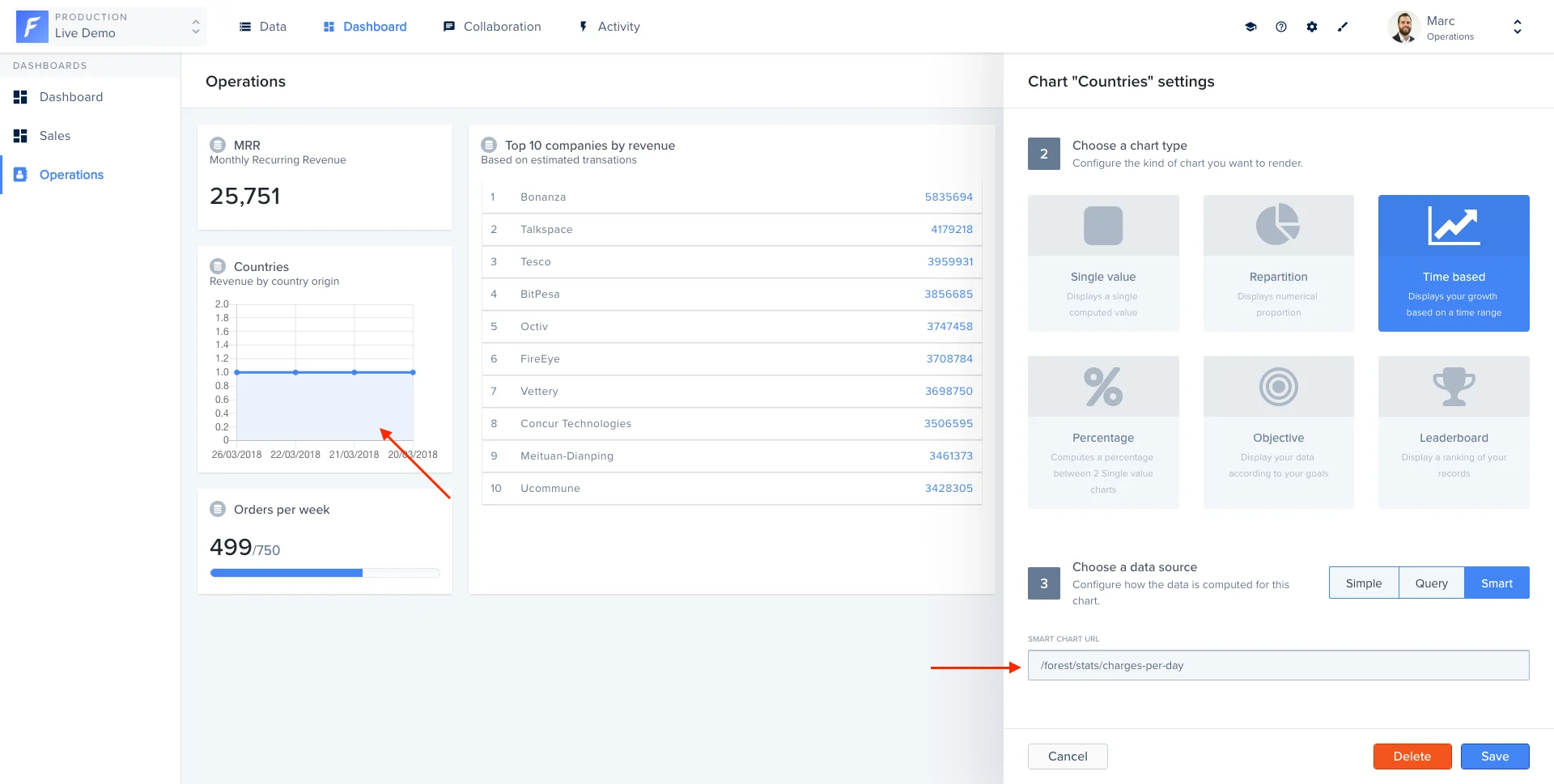
On our Live Demo, we have aCharges time-based chart which shows the number of charges per day. This chart queries the Stripe API to get all charges made in the current month (in March for this example) and group data by day.
- SQL
- Mongoose
- Rails
- Laravel
When serializing the data, we use the
Liana.StatSerializer() serializer. Check the value syntax below.{
value: [{
label: <string> ,
values: { value: <number> }
}, {
label: <string> ,
values: { value: <number> }
}, …]
}
const _ = require('lodash');
const P = require('bluebird');
const express = require('express');
const router = express.Router();
const Liana = require('forest-express-sequelize');
const stripe = require('stripe')(process.env.STRIPE_SECRET_KEY);
const moment = require('moment');
router.post('/stats/charges-per-day', (req, res) => {
let values = [];
let from = moment.utc('2018-03-01').unix();
let to = moment.utc('2018-03-31').unix();
return stripe.charges
.list({
created: { gte: from, lte: to },
})
.then((response) => {
return P.each(response.data, (charge) => {
let date = moment.unix(charge.created).startOf('day').format('LLL');
let entry = _.find(values, { label: date });
if (!entry) {
values.push({ label: date, values: { value: 1 } });
} else {
entry.values.value++;
}
});
})
.then(() => {
let json = new Liana.StatSerializer({
value: values,
}).perform();
res.send(json);
});
});
module.exports = router;
When serializing the data, we use the
Liana.StatSerializer() serializer. Check the value syntax below.{
value: [{
label: <string> ,
values: { value: <number> }
}, {
label: <string> ,
values: { value: <number> }
}, …]
}
const _ = require('lodash');
const P = require('bluebird');
const express = require('express');
const router = express.Router();
const Liana = require('forest-express-mongoose');
const stripe = require('stripe')(process.env.STRIPE_SECRET_KEY);
const moment = require('moment');
router.post('/stats/charges-per-day', (req, res) => {
let values = [];
let from = moment.utc('2018-03-01').unix();
let to = moment.utc('2018-03-31').unix();
return stripe.charges
.list({
created: { gte: from, lte: to },
})
.then((response) => {
return P.each(response.data, (charge) => {
let date = moment.unix(charge.created).startOf('day').format('LLL');
let entry = _.find(values, { label: date });
if (!entry) {
values.push({ label: date, values: { value: 1 } });
} else {
entry.values.value++;
}
});
})
.then(() => {
let json = new Liana.StatSerializer({
value: values,
}).perform();
res.send(json);
});
});
module.exports = router;
When serializing the data, we use the
serialize_model() method. Check the value syntax below.{
value: [{
label: <string> ,
values: { value: <number> }
}, {
label: <string> ,
values: { value: <number> }
}, …]
}
Rails.application.routes.draw do
# MUST be declared before the mount ForestLiana::Engine.
namespace :forest do
post '/stats/charges-per-day' => 'charts#charges_per_day'
end
mount ForestLiana::Engine => '/forest'
end
class Forest::ChartsController < ForestLiana::ApplicationController
def charges_per_day
values = []
from = Date.parse('2018-03-01').to_time(:utc).to_i
to = Date.parse('2018-03-31').to_time(:utc).to_i
Stripe::Charge.list({
created: { gte: from, lte: to },
limit: 100
}).each do |charge|
date = Time.at(charge.created).beginning_of_day.strftime("%d/%m/%Y")
entry = values.find { |e| e[:label] == date }
if !entry
values << { label: date, values: { value: 1 } }
else
++entry[:values][:value]
end
end
stat = ForestLiana::Model::Stat.new({ value: values })
render json: serialize_model(stat)
end
end
{
  value: [{
    label: <string> ,
    values: { value: <number> }
  }, {
    label: <string> ,
    values: { value: <number> }
  }, …]
}
Objective API-based Chart
Creating an Objective Smart Chart means you’ll be fetching your data from an external API endpoint:.png?fit=max&auto=format&n=XG_FfWf8cKiyLgEH&q=85&s=4976abd8f196c5e63db1149cc95494dc)
{
  value: {
    value: xxxx,
    objective: yyyy
  }
}
- SQL
- Mongoose
- Rails
- Laravel
// [...]
const Liana = require('forest-express-sequelize');
// [...]
router.post('/stats/some-objective', (req, res) => {
// fetch your data here (a promise must be returned)
.then(() => {
let json = new Liana.StatSerializer({
value: {
value: fetchedValue,
objective: fetchedObjective
}
}).perform();
res.send(json);
}
}
// [...]
const Liana = require('forest-express-mongoose');
// [...]
router.post('/stats/some-objective', (req, res) => {
// fetch your data here (a promise must be returned)
.then(() => {
let json = new Liana.StatSerializer({
value: {
value: fetchedValue,
objective: fetchedObjective
}
}).perform();
res.send(json);
}
}
...

namespace :forest do
  post '/stats/some-objective' => 'customers#some_objective'
end

...
...

def some_objective
  # fetch your data here
  stat = ForestLiana::Model::Stat.new({
    value: {
      value: 10, # the fetched value
      objective: 678 # the fetched objective
    }
  })
  render json: serialize_model(stat)
end

...
{
  value: {
    value: xxxx,
    objective: yyyy
  }
}